As an Amazon Associate, we earn from qualifying purchases. Some links on this site are affiliate links at no extra cost to you. Our recommendations are based on thorough research and editorial judgment.


Sharpness Vs “Video Look”: In-Camera Processing Explained

In understanding sharpness versus the “video look,” we see that in-camera processing greatly influences our images’ clarity and aesthetic. High detail settings create a stark, clinical appearance often associated with the video look, while effective dynamic range management enhances subtle details, characteristic of cinematic styles. Capturing footage with flat profiles allows for better color grading and reduces harshness. By adjusting these settings, we can achieve a more balanced visual experience, and further insights await those interested in enhancing their techniques.
Key Takeaways
- Excess sharpness can create a harsh “video look”, making footage appear overly processed and unnatural.
- Dynamic range impacts image quality; higher ranges reveal more detail in both highlights and shadows, reducing the video look.
- Flat color profiles, like Log, allow for greater dynamic range and flexibility in post-production, helping to avoid the over-processed appearance.
- In-camera processing, including sharpness settings, must be balanced to maintain a natural aesthetic without introducing unwanted artifacts or harshness.
- Frame rate affects motion perception, with 24 fps providing a cinematic feel while higher rates can enhance clarity but risk the video look.
Defining the ‘Video Look’: Key Differences From Cinematic Styles

Hey there! Let’s chat about the ‘video look’ and what makes it so different from traditional cinematic styles. When we talk about the video look, think sharper and more contrasty images that can sometimes feel a bit over-processed. Imagine watching a home video where everything looks crystal clear, but you lose those beautiful shades and soft transitions you’d find in a movie.
On the other hand, cinematic styles capture a wider range of light and dark, letting you see all those little details. For instance, in a film, you might notice how the sunlight filters through the trees or how shadows play across a character’s face. That’s because movies generally use a frame rate of 24 frames per second, which gives the motion a smooth and familiar feel.
In contrast, the video look often uses higher frame rates, like 30 or even 60 fps. This makes the footage appear super smooth—think of how sports broadcasts feel. But this smoothness can come at the cost of atmosphere and depth. Since there’s less motion blur, the action can sometimes feel more flat and less immersive compared to the lush visual experience we get in films. Additionally, many vlogging cameras use advanced stabilization technology that further enhances the crispness and steadiness of video, contributing to that distinctive look.
The Role of In-Camera Processing in Defining Sharpness

You know, in-camera processing is really crucial when it comes to sharpness in your footage. It’s all about how your camera enhances detail and how we perceive that detail. Different camera models have their own default sharpness settings, and these can really change the overall quality of your images. For instance, some cameras crank up the detail, but at the cost of that soft, natural look we often want in our shots.
Now, a little sharpening can go a long way in making your footage clearer. Just think about how a well-focused landscape shot can pop with a bit of enhancement. But be careful—too much adjustment can introduce artifacts like harsh edges or unwanted grain, resulting in that overly crisp “video look” that’s not very appealing. If you want a more organic vibe, it’s worth tweaking those sharpness settings, especially when you’re using a camera with a larger sensor, which can give you that gorgeous, blurry background we love for portraits.
If you’re shooting in raw format, you’re really setting yourself up for success in post-production. It gives you the flexibility to fine-tune sharpness without any of that artificial enhancement. By managing sharpness in these ways, you’ll keep your footage looking authentic and true to life. So, as you explore different settings, think about how these adjustments can complement your creative vision. Now, let’s talk about how lighting plays a vital role in your footage next. When monitoring your footage, using a high brightness monitor can help you accurately judge sharpness and detail in various lighting conditions.
Recommended Products

High Resolution: With Sony 100-400mm Lens, the picture quality is not compromised throughout full the zoom range. The lens aspherical component overcomes spherical aberration and distortion & the ED glass elements minimize the chromatic aberration.

24.3MP X Trans CMOS III APS C sensor with no low pass filter and X Processor Pro
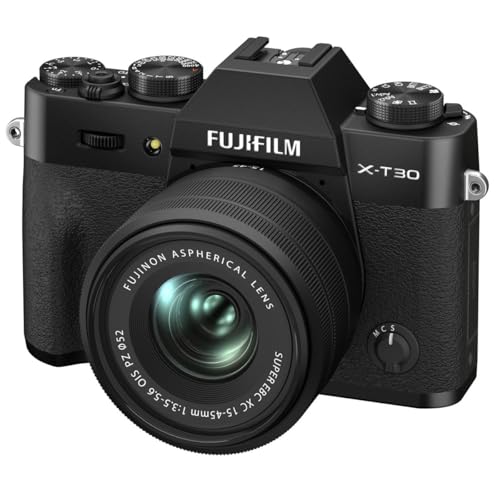
Assured Image Quality X-T30 II uses Fujifilm’s fourth-generation X-Trans CMOS 4 back-illuminated sensor, designed to minimize noise, while also extending sensitivity to ISO 160. The unique structure of the X-Trans color filter array also minimizes moiré and false colors, without the need for an optical low pass filter – ensuring the best possible image quality, packed with detail and vibrant, true-to-life color.
How Dynamic Range Affects the Video Look

Dynamic range plays a huge role in how we view video quality. It’s all about how much variation in brightness a camera can capture. Think of it like this: a camera with a high dynamic range can show more detail in both super bright areas, like the sky, and really dark spots, like shadows under a tree. For instance, professional cameras often boast around 12 to 15 stops of dynamic range, which means they can really pick up all those subtle tonal shifts in high-contrast scenes. But if you’re using a consumer-grade camera, you might only get about 6 to 10 stops—so you could lose some color and detail in those tricky lighting situations.
Now, when you’re shooting video, using a flat color profile, often called Log, can really help make the most of your dynamic range. It might make your footage look a bit dull at first, but this flat look provides you with plenty of flexibility during color grading. That way, you can bring out those details and colors during editing, allowing you to avoid that common “video look” that many people want to steer clear of. It’s all about enhancing the overall cinematic experience. Next up, let’s explore how lighting can further impact your shots and overall video quality!
Many camcorders also include digital anti-shake technology to maintain image clarity even in handheld shooting situations.
Recommended Products

SONY FX3 CAMERA INCLUDES: Sony FX3 Full-Frame Cinema Line Camera | Sony FE 24-70mm f/2.8 GM II Lens | Lexar Professional 128GB Memory Card | Battery Pack with USB-C Port | 82mm Digital Essentials Filter Kit | Multi-Device Shoulder Bag | Complete Optics Care and Cleaning Kit

SONY FX3 CAMERA INCLUDES: Sony FX3 Full-Frame Cinema Line Camera | Sony FE 16-35mm f/2.8 GM Lens for Sony E

SONY FX3 CAMERA INCLUDES: Sony FX3 Full-Frame Cinema Line Camera | Sony FE 24-70mm f/2.8 GM II Lens | Lexar Professional 128GB Memory Card
Identify Excess Sharpness and Its Effects on Footage
Hey! So, let’s chat about excess sharpness in footage and how it can really change the way your video looks. When you crank up those detail settings on cameras, your footage can end up looking way too sharp, almost like it’s trying too hard and comes off as harsh or unnatural. It’s like watching a cartoon where the lines are too bold and there’s just too much detail—it can really pull you out of the moment.
For example, if you’re filming a scenic landscape, too much sharpness might create distracting edges around trees or mountains, making them look almost fake instead of beautifully blended with the background. Instead of enhancing your image, that excess sharpness can actually amplify noise, which is definitely not what you want when you’re aiming for that cinematic feel.
A good rule of thumb is to soften those detail settings, especially if you’re using a larger sensor camera. This approach can make your shots look much more appealing and organic. Plus, remember that different cameras handle sharpness in their own unique ways, so it’s worth testing out what works best for yours. By finding that sweet spot with your sharpness, you can keep everything looking natural and visually engaging. Speaking of visuals, let’s dive into how color grading can further enhance that organic look!
Also, many professional camcorders include built-in ND filters that help control exposure without affecting the sharpness, allowing for better image quality in bright conditions.
Recommended Products

Items Include: 1 x Canon RF 85mm f/1.2L USM DS Lens, 1 x 82mm 3 Piece Filter Kit, 1 x Lens Cap Keeper, 1 x Cleaning Kit

NIKON USA AUTHORIZED - Includes Full NIKON USA WARRANTY

Go Beyond Your Phone: Capture lifelike colors and incredible details from dawn to dusk thanks to a superior 20.9-megapixel DX format (APS-C size) sensor several times larger than that of a typical smartphone, but still lightweight and compact enough to fit in a small bag.
Effects of Frame Rate on Motion Perception
Have you ever thought about how frame rate affects what you see in movies or videos? It really does change how we perceive motion! The standard frame rate for films is 24 frames per second (fps), which gives that classic cinematic feel and just the right amount of motion blur that we associate with movies.
When you bump up the frame rate to 30 fps or 60 fps, everything looks much smoother. This is especially noticeable during fast action scenes, like car chases or sports events. However, that smoothness can sometimes take away the dreamy quality of a film, making it feel more like a video than a movie. It’s kind of like when you watch a soap opera; the clarity can make it seem less dramatic.
For example, a thrilling chase scene in an action blockbuster may benefit from the high frame rate, allowing you to see every detail of the stunt. But if you’re watching a heartfelt drama, that tactile feel of 24 fps can make the emotional moments hit harder. So, the frame rate you choose really shapes how a story comes across to the audience. Next time you watch something, pay attention to how the frame rate impacts your experience! This is why many professional 4K camcorders use bit rates up to 200 Mbps to maintain video quality even at higher frame rates.
The Impact of Detail Settings on Image Quality
Hey there! Let’s chat about detail settings and how they seriously impact image quality in video production. You know how sometimes videos look a bit too sharp and almost unnatural? That excess sharpness can create weird artifacts, like those halo effects around edges, which often give it that dreaded “video look.” This can really take away from the cinematic feel we’re after.
Luckily, if you’re using a modern camera, you have the power to tweak those detail settings. For example, bringing down the sharpness a notch can help reduce harsh noise, especially in low-light scenes. Imagine shooting a cozy evening scene by candlelight; lowering the sharpness can keep the vibe warm and inviting, rather than harsh and grainy.
But finding the sweet spot is key! A little enhancement can help out-of-focus shots look better, but if you go overboard, you might end up losing vital details. So, adjusting these settings while shooting is crucial for keeping that lovely, cinematic integrity in your footage. It sets the stage perfectly for what we’ll discuss next: how lighting choices can further elevate your image quality!
Additionally, ensuring your camera maintains precision in adjustments can significantly improve image clarity and reduce unwanted distortion.
How Lighting Affects the Video Look
When it comes to creating that cinematic look in our videos, lighting plays a crucial role. The quality and direction of our lighting can really make or break the footage. For instance, using soft and diffused lighting can help reduce those harsh shadows that often make video look too clinical or sharp. This gentle light gives our scenes a more natural vibe which is a big part of that filmic quality we all admire.
One technique that can really help is high dynamic range (HDR). It captures more vivid colors and a wider range of tones, lending an organic feel to our visuals. Imagine how much richer a sunset looks when we let HDR work its magic! Plus, sticking to consistent lighting setups is key to avoiding that overly sharp “video look.” For example, if you’re shooting indoors, using a couple of softbox lights can help smooth everything out and give it a more professional touch.
But let’s be careful with low-light situations. They can lead to noise in the footage, which only underscores that dreaded video look. You might want to bring in a small LED light if you find yourself shooting in darker environments—that can really elevate the quality without adding any unwanted grain. So, whether you’re shooting a home video or a short film, paying attention to your lighting will definitely help you achieve that cinematic feel we all love. Using variable ND filters can further enable you to control exposure perfectly in bright conditions, enhancing the overall video look.
Now, let’s think about how composition can play a role in enhancing that visual storytelling.
Techniques to Reduce the Video Look in Your Footage
When we talk about reducing that pesky video look in our footage, it’s all about refining our techniques to give our work a more cinematic feel. One great way to start is by shooting in flat picture profiles, like Log. This helps us capture a wider range of colors and details, allowing for better post-production grading—think of it as having a blank canvas to work with.
Another tip is to lower the sharpness settings in your camera. High sharpness can create that “soap opera effect,” which is often too polished and makes everything feel less natural. For example, dialing down the sharpness can help your footage appear more film-like, especially when capturing delicate textures like skin.
Don’t forget about how we expose our shots! Proper exposure is crucial, especially for skin tones. Using tools like vectorscopes can help ensure you’re hitting those ideal levels. Plus, setting your frame rate to 24p will give you the perfect amount of motion blur. And keeping an eye on your shutter speed will help you avoid those annoying rolling shutter artifacts.
Finally, managing your lighting well means you can stick to a lower ISO setting. This approach reduces noise in your footage and keeps those important details intact. Utilizing the Super 35mm Dual Gain Output sensor can also significantly improve image quality by capturing more dynamic range in challenging lighting conditions. With these practical tips, you’re well on your way to elevating your work. Next up, let’s explore some lighting techniques that can really elevate your visuals!
Post-Production Grading: Adjusting Perceived Sharpness
Hey there! Have you ever considered how important post-production grading is for the sharpness of your footage? It’s not just about what camera settings you use; it’s about how you tweak the footage afterward to bring out those little details. Think of it like enhancing the colors and contrast in a painting—it makes everything pop!
For instance, when you adjust the contrast, you can create more distinction between the light and dark areas, which can make your footage look sharper. If you shoot in a flat picture profile, you’re capturing a wide range of tones, which gives you more leeway to adjust everything during grading without losing information. This means that fine details—like the texture on a character’s face—can stand out more without making the image look fake or over-processed.
It’s all about finding that sweet spot. You want to enhance those details while avoiding any weird artifacts that might make your project look unnatural. So, whether you’re correcting colors or adjusting curves, remember that those small changes can significantly impact the overall look of your film. It’s a creative process, and the results can make a world of difference in how your audience perceives your work! High-quality cables with fast data transfer speeds can also help ensure that the footage remains crisp and uncorrupted during file transfers.
Final Thoughts: Striking a Balance in Sharpness for Effective Storytelling
Finding the right balance in sharpness is super important for telling a good story. If you crank up the sharpness too high, your footage can start to look overly polished—kind of like a commercial video. You want your audience to feel immersed, not distracted by images that seem too crisp. So, keeping sharpness at a moderate level helps draw attention to the subjects without making them feel artificial.
One way to manage sharpness effectively is to use flat picture profiles when you shoot. This approach gives you more flexibility to make adjustments in post-production while preserving that cinematic look. For instance, when you’re filming a sunset, you might choose a softer focus on the horizon to enhance the dreamy feel of the scene rather than making it too sharp and harsh.
Additionally, it’s key to think about how sharpness ties in with other elements like lighting and lens choice. Picture this: a beautifully lit scene with a slightly softened background can really highlight the emotion of a character’s expression. When all these aspects work together, you create a rich visual experience that supports your narrative without the risk of looking overly digital. So, as you refine your storytelling techniques, remember that a thoughtful approach to sharpness can truly enhance the emotional depth of your project.
Frequently Asked Questions
What Does Sharpness Do in a Camera?
Have you ever wondered how sharpness impacts our images? It enhances edge contrast while affecting dynamic range and color depth. Proper adjustments can also assist with noise reduction, creating a more visually appealing photograph for us.
Does Sharpness Increase Quality?
Sharpness enhancement doesn’t always increase quality; it can boost image clarity but may distort detail perception. We should be cautious, as overdoing it can create unwanted artifacts and diminish the overall impact of our visuals.
Why Does Film Look Different Than Video?
Film looks different than video because it has those charming, soft characteristics, while video’s sharp aesthetics often scream for attention. With some clever color grading, we might bridge that gap, but let’s be honest, it’s tricky!
Which Is Better, 3/2 or 16:9?
We generally believe 16:9 is better for most projects. Its wider aspect ratio enhances that cinematic feel audiences love, aligning with viewer preference for immersive storytelling, whereas 3:2 suits more niche, artistic endeavors.


