As an Amazon Associate, we earn from qualifying purchases. Some links on this site are affiliate links at no extra cost to you. Our recommendations are based on thorough research and editorial judgment.


Building a Practice Routine: Weekly Exercises to Improve Video Fast

To build an effective practice routine for fast video editing, we can focus on weekly exercises that enhance our skills systematically. We should master keyboard shortcuts for our editing software, explore unique features, and engage in recreating iconic movie scenes to refine our pacing and storytelling. Adding music to our edits helps improve timing, while effective storyboarding streamlines our workflows. By setting aside time for practical drills, we can elevate our editing performance considerably. There’s much more we can uncover.
Key Takeaways
- Dedicate one hour each week to practice specific editing techniques, such as jump cuts and color grading, to enhance skill mastery.
- Create a cheat sheet of keyboard shortcuts tailored to your editing software to boost speed and efficiency during editing sessions.
- Engage in storyboarding exercises to plan your videos visually, which helps streamline your editing process and reduces time spent on clip selection.
- Analyze and recreate iconic movie scenes weekly to improve pacing, rhythm, and emotional storytelling through practical hands-on experience.
- Pair video footage with music to practice syncing, focusing on aligning cuts with rhythms to enhance emotional impact and pacing in edits.
Master Keyboard Shortcuts for Faster Editing

Hey there! So, when it comes to video editing, mastering keyboard shortcuts is such a game changer for speeding up your workflow. Seriously, if you’re using Premiere Pro and not utilizing shortcuts, you’re missing out on a lot of efficiency! Think about it: every time you reach for your mouse, you’re interrupting your creative flow.
One thing I recommend is making a cheat sheet of the most important shortcuts. This way, you can start to build muscle memory, and before you know it, you’ll be zipping through your edits. For example, learning that pressing “C” switches to the razor tool and “V” goes back to the selection tool can save you so much time during the editing process. Plus, customizing the shortcuts to suit your style can really give you that personal touch in your editing routine.
Don’t forget to get familiar with the undo functions as well; they’re your best friend when you accidentally make a mistake! Putting in a little practice with these shortcuts can boost your speed and allow you to concentrate more on the creative aspects rather than fussing over the technical stuff. Using efficient tools like the Tilta Full Camera Cage can also streamline your filming process, so you have less to worry about in post-production. So, ready to elevate your editing game? Next up, let’s explore some of the most useful shortcuts that you can start using right away!
Explore Unique Features in Your Video Editing Software
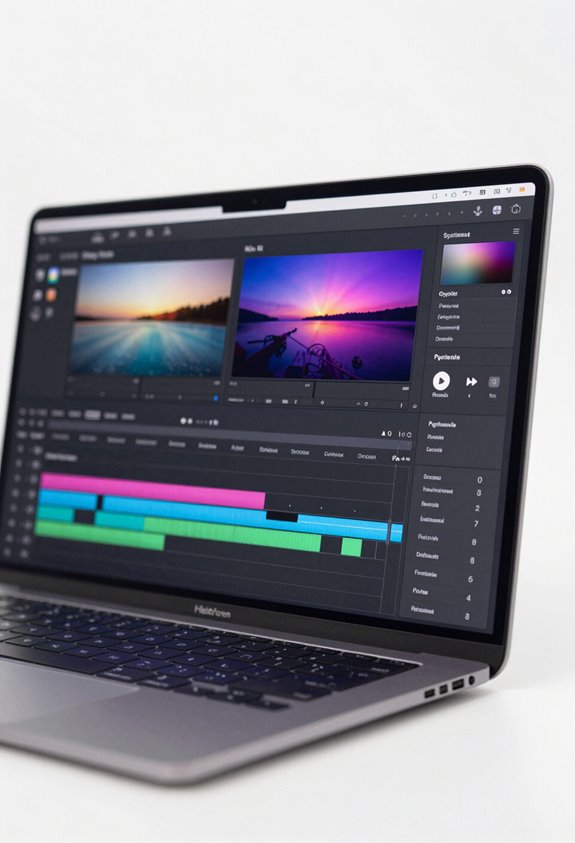
Hey there! You know, when it comes to video editing software, there are so many unique features that can really amp up your editing game and storytelling skills. It’s kind of like having a treasure chest of tools at your disposal. The first step is to get comfortable navigating all those menus. Have you ever noticed how some software has hidden gems, like advanced color correction or customizable transitions? Just experimenting with these features can make a huge difference in how polished your videos look.
For instance, if you’re working with Adobe Premiere Pro, have you tried using the Lumetri Color panel for color grading? It offers really intuitive controls that can dramatically enhance your footage. Or, if you’re using Final Cut Pro, the magnetic timeline helps you instantly adjust clips and sounds without worrying about gaps.
And don’t overlook the shortcuts! Learning a few key commands can seriously speed up your workflow. Check out the built-in tutorials too—they can really help you understand features you might not have explored yet, like audio mixing or special effects. These insights can truly enrich your video projects and make editing more fun. Speaking of fun, have you experimented with adding text overlays or animations? That’s another awesome way to bring your videos to life! Also, consider using softboxes to create perfectly diffused lighting for your video shoots, enhancing the overall image quality.
Recreate Iconic Movie Scenes to Improve Editing Skills

Hey! If you’re looking to level up your video editing skills, recreating iconic movie scenes can be a fantastic way to do it. Just think about how much you can learn by breaking down these memorable moments. You can really get a feel for pacing and emotion in how they’re put together, which gives you clear goals to focus on in your own work.
Before you start, it’s a good idea to gather all your video clips, audio tracks, and any graphics you need. This way, you’re not scrambling around trying to find things while you’re in the zone. Plus, when you try to match the timing and mood of the original scene, it sharpens your sense of rhythm. For instance, if you take on a scene from a movie like “The Godfather,” pay attention to the slow, steady pacing in the dialogue and how it builds intensity.
Another tip is to get comfortable with keyboard shortcuts in your editing software. They can save you a ton of time and help you stay creative without getting bogged down in the technical stuff. As you tackle different scenes, you’ll naturally experiment with various styles and effects, which means your skill set will grow and diversify. Not only will your editing improve, but your storytelling will, too. Using cameras with high-resolution video can also enhance the clarity and quality of your footage, making your edits look more professional.
Using Music to Improve Editing Pacing
Using music to improve editing pacing might sound a bit like an afterthought, but trust me, it can make a huge difference in your video projects. When you edit to the rhythm of a track, you’re not just cutting clips together; you’re tying your visuals and emotions together in a way that really resonates with your audience. Think about it: when you hear a song you love, it stirs feelings and memories, right? That’s exactly what we want to evoke in our viewers.
As you’re working on your edit, try tapping your foot or even clapping along to the music. This helps you catch those natural beats and keeps everything flowing smoothly. For instance, if there’s a strong drumbeat, consider aligning your cuts or transitions with that beat. It creates a more enjoyable viewing experience. Regularly play your footage alongside your selected music, tweaking the pacing as you go. You’ll be surprised at how well your visuals can sync up with the sound.
Ultimately, this method elevates the storytelling, making it more compelling. The more you practice, the better you’ll become at intuitively knowing how the rhythm can shape your narrative. Plus, it opens up new ways to engage viewers, making them feel more connected to what they’re watching. What’s next? Let’s explore ways to select the right music that amplifies your message even further. Using high-quality footage captured with 3-axis stabilization can further enhance the impact of your rhythm-aligned edits.
Effective Storyboarding Techniques for Streamlined Editing Workflows
You know, having a solid narrative foundation is absolutely crucial when it comes to making captivating video content. That’s where effective storyboarding techniques really come into focus. Think of a storyboard as your video’s blueprint—it lays out the order of scenes, making it much easier to edit your footage later on. When you have a clear visual guide, you spend less time hunting for clips that fit and more time telling your story!
For example, if you’re creating a short film about a day in the life of a baker, your storyboard would show each scene, like the baker kneading dough or decorating a cake. This setup helps you remember key elements like camera angles and what the characters are saying. Plus, jotting down notes about sound effects can help the production team stay on the same page, making the editing process smoother.
With an organized storyboard in hand, you can spot any pacing or timing issues before they become a headache. This way, your final product comes out polished and stays true to your creative vision. And once you have the hang of this, you might start thinking about how to pre-visualize your shots even better. Wouldn’t that be a fun next step?
To truly elevate your workflow, consider pairing your storyboard with an Atomos monitor to enhance on-set visibility and real-time adjustments.
Practical Drills to Enhance Your Editing Performance
Hey there! If you’re looking to boost your editing performance, there are some really practical drills you can try that will not only sharpen your skills but also help you understand narrative pacing and style better. One fun exercise is to pick a scene from a movie you love and try to recreate it. This lets you really analyze how the pacing works and how style plays a role in storytelling—plus, you get to work with actual footage, which is super engaging!
Setting aside about an hour each week for these drills can make a huge difference. It’s like giving yourself a mini-editing workshop; you can focus on a specific technique and really track how you improve over time. For example, you might choose to concentrate on jump cuts one week and then explore cross-cutting the next.
Also, don’t forget the power of keyboard shortcuts! Learning a few can save you a ton of time by speeding up repetitive tasks in your editing software. Another great tip? Try editing your footage to music that you love. You’ll find that aligning your cuts to the rhythm of a song will heighten the emotional impact of your work and improve your timing.
Oh, and sketching out storyboards before you start editing can be a lifesaver. It streamlines your workflow and cuts down on all that time spent searching for clips later on. By having a visual plan, you’re setting yourself up for a smoother editing process. So, whether you’re recreating scenes or rocking out to your favorite tracks, these drills can set a solid foundation for your editing journey!
Using footage shot with cameras offering high dynamic range can further enhance your ability to work with lighting and exposure during editing.
Recommended Products

[11.6-Inches 1080P HD IPS Drawing Monitor]--Enjoy a vivid display with the GAOMON PD1161 drawing tablet's 11.6-inch 1920x1080 HD IPS monitor, featuring a 72% NTSC (100% SRGB) color gamut and a viewing angle of 178°. WORK AREA : 256.32×144.18mm (10*5.7 inch) // Signal Output: Mini HDMI &Type-C.

SPEED UP YOUR CREATIVE WORKFLOW: Work smarter and faster in Adobe Premiere Pro with preprogrammed editing shortcuts designed for creative professionals. The Dash keyboard eliminates repetitive keystrokes and streamlines complex commands. By reducing clicks and menu navigation, you can stay fully focused on the creative process instead of getting lost in menus.
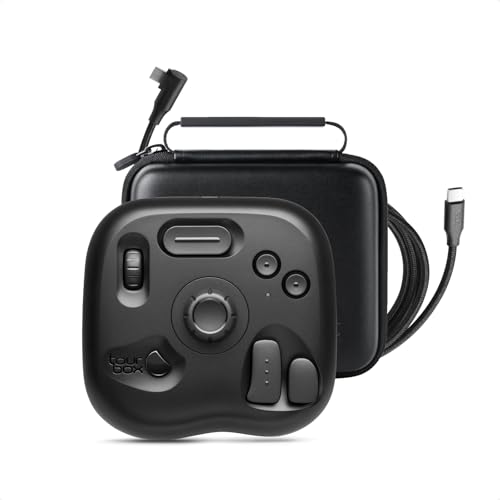
INNOVATIVE-EFFICIENT CONTROL: TourBox powerful Software-Hardware solution, turn intuition into creative productivity. 8 Buttons, 50+ Actions, 200+ Functions, master all creative workflows with eye-free control. Customizable Software with rapid updates and rich presets
Frequently Asked Questions
What Is the 5 5 5 30 Rule?
The 5 5 5 30 Rule is a structured approach for video editing, allowing us to manage time effectively. It promotes skill development by encouraging quick decision-making, streamlining the editing process for faster results.
What Is the 3/2/1 Rule in Gym?
The 3/2/1 rule in gym training involves three days of strength training, two days of cardio, and one day for exercise recovery. It helps us manage workout intensity and maintain balanced fitness throughout the week.
What Is a Good Weekly Workout Routine to Build?
For a good weekly workout routine, we’ll include strength training twice a week, cardio sessions threes times, and flexibility exercises on off days. This balance’ll promote overall fitness and keep us motivated and engaged.
What Is the 2 2 2 Workout Method?
The 2 2 2 workout method’s like a well-crafted symphony; we engage muscles with two exercises, two sets each, ensuring workout intensity without the fatigue. It’s perfect for fitness progression and exercise recovery, embracing our time wisely.


