As an Amazon Associate, we earn from qualifying purchases. Some links on this site are affiliate links at no extra cost to you. Our recommendations are based on thorough research and editorial judgment.


7 Best Color Grading Monitors That Every Creative Should Consider

When choosing a color grading monitor, consider the BenQ SW272Q for its 2K resolution and impressive color accuracy with 99% Adobe RGB coverage. The ASUS ProArt Display PA278QV features WQHD resolution and 100% sRGB support, ideal for vibrant visuals. For 4K options, check the ASUS ProArt 32” PA329CRV and BenQ PD3225U, both providing stunning clarity and extensive color gamut. Each option addresses creative professionals’ needs, ensuring precision in color representation. Learn more about these choices and other top contenders.
Key Takeaways
- High Resolution: Opt for monitors with at least 4K UHD resolution for enhanced clarity and detail in color grading tasks.
- Color Accuracy: Choose displays with Delta E values under 2 for exceptional color fidelity, crucial for precise editing.
- Wide Color Gamut: Look for monitors with 100% sRGB and high DCI-P3 coverage to ensure vibrant and accurate color representation.
- Calibrated Displays: Factory-calibrated monitors save time and guarantee color consistency, essential for professional work in photography and videography.
- Versatile Connectivity: Ensure the monitor supports HDMI, DisplayPort, and USB-C to accommodate various devices and enhance your workflow.
| BenQ SW272Q 27-inch 2K Photographer Monitor |  | Best for Photographers | Screen Size: 27 inches | Resolution: 2K (1440p) | Color Accuracy: 99% Adobe RGB, 98% DCI-P3 | VIEW LATEST PRICE | Read Our Analysis |
| ASUS ProArt Display PA278QV 27″ WQHD Monitor |  | Best Color Accuracy | Screen Size: 27 inches | Resolution: WQHD (2560 x 1440) | Color Accuracy: 100% sRGB, ΔE < 2 | VIEW LATEST PRICE | Read Our Analysis |
| ASUS ProArt 32” Professional Monitor (PA329CRV) |  | Ultimate 4K Experience | Screen Size: 31.5 inches | Resolution: 4K UHD (3840 x 2160) | Color Accuracy: 98% DCI-P3, ΔE < 2 | VIEW LATEST PRICE | Read Our Analysis |
| ASUS ProArt Display PA247CV 24-inch Monitor |  | Compact Yet Powerful | Screen Size: 24 inches | Resolution: Full HD (1920 x 1080) | Color Accuracy: 100% sRGB, ΔE < 2 | VIEW LATEST PRICE | Read Our Analysis |
| BenQ PD3225U 32 Inch 4K Thunderbolt Monitor |  | Best for Mac Users | Screen Size: 32 inches | Resolution: 4K UHD (2160p) | Color Accuracy: 98% P3, ΔE ≤ 2 | VIEW LATEST PRICE | Read Our Analysis |
| LG 32-Inch Ultrafine 6K Professional Monitor | 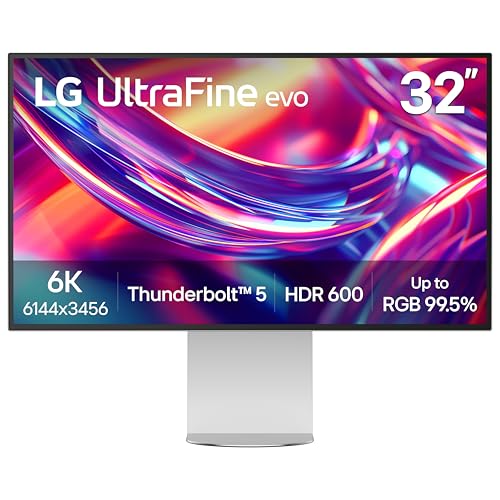 | Top-tier Resolution | Screen Size: 32 inches | Resolution: 6K UHD (6144 x 3456) | Color Accuracy: 99.5% Adobe RGB, ΔE < 2 | VIEW LATEST PRICE | Read Our Analysis |
| ASUS ProArt 32″ 4K HDR Monitor (PA329CV) |  | Versatile Professional Monitor | Screen Size: 32 inches | Resolution: 4K UHD (3840 x 2160) | Color Accuracy: 100% sRGB, ΔE < 2 | VIEW LATEST PRICE | Read Our Analysis |
More Details on Our Top Picks
BenQ SW272Q 27-inch 2K Photographer Monitor
Introducing the BenQ SW272Q 27-inch 2K Photographer Monitor – your go-to solution for stunning visuals and accurate color representation. This monitor is designed specifically for photographers and creatives like you who demand the best. Here’s why the SW272Q should be your next investment:
Key Features:
- 2K (QHD) Resolution at 1440p: Enjoy crystal-clear images that bring your work to life.
- 16:9 Aspect Ratio: Perfect for all types of content, from photography to video editing.
- 1.07 Billion Colors: Experience vibrant and rich visuals with advanced Nano Matte Panel technology.
- 99% Adobe RGB & 98% DCI-P3 Coverage: Achieve exceptional color depth and accuracy for your artistic projects.
- TUV Anti-Reflection Certification: Work comfortably without annoying glare, ensuring better focus on your creations.
- HDR Support: Get enhanced contrast and brightness for a truly immersive viewing experience.
Why Choose the BenQ SW272Q?
- Accurate Color Representation: Ideal for photographers who need precision in color grading and editing.
- Enhanced Comfort for Long Sessions: Say goodbye to eye strain, even during extended work hours.
- Create with Confidence: With industry-standard color spaces, your designs will look stunning across various mediums.
Ready to elevate your creative projects? Don’t wait any longer! The BenQ SW272Q is waiting for you to explore its capabilities. Grab yours today and start producing stunning visuals that truly reflect your vision!
- Screen Size:27 inches
- Resolution:2K (1440p)
- Color Accuracy:99% Adobe RGB, 98% DCI-P3
- Aspect Ratio:16:9
- Connectivity:USB, HDMI, DisplayPort
- Calibration:Hardware calibration supported
- Additional Feature:Nano Matte Panel surface
- Additional Feature:Paper Color Sync technology
- Additional Feature:Hardware calibration software
ASUS ProArt Display PA278QV 27″ WQHD Monitor
If you’re a creative professional who values color accuracy, the ASUS ProArt Display PA278QV is your perfect match! Here’s why this 27-inch WQHD monitor (2560 x 1440 resolution) should be your next investment:
Key Features:
- Exceptional Color Performance: Achieve true-to-life visuals with 100% sRGB and 100% Rec. 709 coverage.
- Factory Calibration: Enjoy accuracy right out of the box with a ΔE < 2, ensuring your colors are always spot on.
- Frameless Design: Experience an immersive viewing experience that keeps your focus where it belongs.
- Versatile Connectivity: Connect easily with Mini DisplayPort, HDMI, and four USB 3.0 ports.
- User Comfort: Benefit from eye care features, including anti-glare technology and ergonomic adjustments, reducing strain during long hours of work.
Why Choose the ASUS ProArt Display PA278QV?
- As a creative, seeing your work with precision is key. This monitor ensures you won’t miss any detail.
- Enjoy a clutter-free workspace with its frameless design and multiple connectivity options.
- Maintain comfort with eye care features designed for extended viewing.
Elevate your creative process and see your work in stunning detail. Don’t miss out on this essential tool for your workspace! Click the link to learn more and make it yours today!
- Screen Size:27 inches
- Resolution:WQHD (2560 x 1440)
- Color Accuracy:100% sRGB, ΔE < 2
- Aspect Ratio:16:9
- Connectivity:HDMI, DisplayPort, USB ports
- Calibration:Factory calibrated ΔE < 2
- Additional Feature:Frameless design
- Additional Feature:ProArt Preset features
- Additional Feature:Complimentary Adobe Creative Cloud
ASUS ProArt 32” Professional Monitor (PA329CRV)
Enhance your creative projects with the ASUS ProArt 32” Professional Monitor (PA329CRV). This monitor is built for professionals who demand precision and clarity in their visual work. Here’s why the PA329CRV is the perfect choice for you:
- Exceptional Color Accuracy: Achieve true-to-life colors with an impressive ΔE < 2. This level of accuracy is crucial for color grading and visual tasks.
- Stunning 4K UHD Resolution: Enjoy crisp details with a 31.5-inch IPS panel offering 3840 x 2160 resolution. Every pixel comes to life, making your work look its best.
- Wide Color Gamut Coverage: Benefit from 98% DCI-P3 color gamut coverage. Experience vivid hues and accurate tones that will elevate your designs.
- Calman Verified: Trust in professional-grade calibration for your editing workflow.
- Robust Connectivity: Stay versatile with USB-C PD (96W), HDMI, DisplayPort, and daisy-chaining capabilities. Connect to multiple devices effortlessly.
Whether you are a photographer, videographer, or graphic designer, the ASUS ProArt 32” Professional Monitor is designed to meet your needs. Don’t miss out on this opportunity to elevate your visual projects. Invest in your creativity today – your work deserves the best!
- Screen Size:31.5 inches
- Resolution:4K UHD (3840 x 2160)
- Color Accuracy:98% DCI-P3, ΔE < 2
- Aspect Ratio:16:9
- Connectivity:HDMI, DisplayPort, USB hub
- Calibration:Factory calibrated, Calman verified
- Additional Feature:VESA DisplayHDR 400 certification
- Additional Feature:Daisy-chain capability
- Additional Feature:Glossy screen surface
ASUS ProArt Display PA247CV 24-inch Monitor
Introducing the ASUS ProArt Display PA247CV 24-inch Monitor—a must-have for creatives who prioritize color accuracy and performance. Here’s why this monitor is an excellent choice for your creative projects:
- Impressive Color Fidelity: Enjoy stunning color accuracy with a ΔE of less than 2. Perfect for graphic designers, photographers, and video editors who need tools they can trust.
- Full Color Coverage: This monitor fully covers both sRGB and Rec. 709 color spaces, ensuring your work looks consistent across different platforms.
- High Definition Display: The 23.8-inch IPS Full HD display (1920 x 1080) offers vibrant visuals with a glossy screen surface that enhances details and colors, making your creations come alive.
- Versatile Connectivity Options: Easily connect to your devices with DisplayPort over USB-C, HDMI, and two USB 3.0 ports. Seamlessly integrate it into any multi-display setup for boosted productivity.
- Factory Calibrated: The monitor comes calibrated right out of the box for reliable color reproduction. Focus on your work without worrying about setup.
Take your creative projects to the next level with the ASUS ProArt Display PA247CV. Experience the difference in color accuracy and detail today. Upgrade your workspace—order now!
- Screen Size:24 inches
- Resolution:Full HD (1920 x 1080)
- Color Accuracy:100% sRGB, ΔE < 2
- Aspect Ratio:16:9
- Connectivity:DisplayPort, HDMI, USB ports
- Calibration:Factory calibrated ΔE < 2
- Additional Feature:Extensive connectivity options
- Additional Feature:Daisy-chain function support
- Additional Feature:Factory calibrated for accuracy
BenQ PD3225U 32 Inch 4K Thunderbolt Monitor
Introducing the BenQ PD3225U 32 Inch 4K Thunderbolt Monitor, the perfect companion for creatives who demand top-notch color accuracy in their work. Here’s why this monitor should be your next investment:
Key Features:
- Stunning 4K UHD Resolution (2160p): Experience crystal-clear images that bring your projects to life.
- Impressive Color Coverage: Enjoy 98% P3 and 100% sRGB, ensuring vivid and true-to-life colors.
- Delta E ≤ 2: You can depend on exceptional accuracy, validated by Pantone and Calman.
- Thunderbolt 3 Connectivity: Simplify your setup with daisy-chaining capabilities and power your devices with 85W USB-C charging.
- Ergonomic Design: Work comfortably with adjustable features and a sleek anodized metal base that complements any workspace.
Why You’ll Love It:
- Achieve professional-grade color precision. Ideal for photographers, designers, and video editors.
- Boost your productivity with a seamless connection and reliable charging.
- Enjoy a comfortable workspace tailored to your needs.
Don’t settle for less when it comes to your creative projects. Upgrade to the BenQ PD3225U and elevate your work today! Click to learn more and enhance your creative workflow.
- Screen Size:32 inches
- Resolution:4K UHD (2160p)
- Color Accuracy:98% P3, ΔE ≤ 2
- Aspect Ratio:16:9
- Connectivity:Thunderbolt, USB-C, DisplayPort, HDMI
- Calibration:Pantone validated, Calman verified
- Additional Feature:Thunderbolt 3 connectivity
- Additional Feature:M-Book mode for Mac
- Additional Feature:Ergonomic design features
LG 32-Inch Ultrafine 6K Professional Monitor
Transform Your Creative Projects with the LG 32-Inch Ultrafine 6K Professional Monitor!
For creatives who demand the best, this monitor is a game changer. Here’s why the LG 32-Inch Ultrafine 6K Monitor should be your next investment:
- Stunning 6K Resolution: Experience crystal-clear visuals with 6144 x 3456 resolution. That’s over 21 million pixels—156% more than standard 4K displays!
- Nano IPS Black Technology: Enjoy deeper blacks and vivid shadows with a 2000:1 contrast ratio. This means better detail in your creative work!
- Exceptional Color Coverage: With up to 99.5% Adobe RGB and 98% DCI-P3, your colors will pop. Achieve ultra-smooth tonal shifts for professional-grade color grading.
- Enhanced Connectivity: Thunderbolt 5 support lets you daisy chain up to 6K displays. Plus, it delivers 96W power to keep your devices charged. Perfect for both Mac and Windows users!
Whether you’re editing photos, videos, or designing graphics, this monitor elevates your workflow.
Don’t settle for less—upgrade your setup today! Explore the LG 32-Inch Ultrafine 6K Professional Monitor and take your creativity to new heights. Click the link to learn more and make it yours!
- Screen Size:32 inches
- Resolution:6K UHD (6144 x 3456)
- Color Accuracy:99.5% Adobe RGB, ΔE < 2
- Aspect Ratio:16:9
- Connectivity:Thunderbolt, HDMI, DisplayPort, USB-C
- Calibration:Calman verified, factory calibrated
- Additional Feature:Ultra 6K resolution
- Additional Feature:Nano IPS Black technology
- Additional Feature:Eye Comfort certification
ASUS ProArt 32″ 4K HDR Monitor (PA329CV)
Elevate your creative projects with the ASUS ProArt 32″ 4K HDR Monitor (PA329CV)! This powerhouse monitor is designed specifically for professionals in fields like color grading and digital content creation. Here’s why it should be your go-to choice:
Key Features:
- Stunning 4K UHD Resolution: Enjoy crystal-clear visuals with 3840 x 2160 resolution that lets you see every detail in your work.
- 32-Inch Display: A spacious screen that provides ample room for multitasking and enhances your productivity.
- Color Accuracy: With Calman Verified color accuracy and factory calibration for a Delta E < 2, trust that your colors will be true-to-life.
- Wide Viewing Angle: The LED backlit IPS panel offers a wide 178° viewing angle, ensuring consistent color representation from any position.
- Versatile Connectivity Options: Connect effortlessly with USB-C Power Delivery, DisplayPort, HDMI, and a USB 3.1 Hub to streamline your workflow.
Why Choose the ASUS ProArt Monitor?
- Precision for Professionals: Your work deserves the best. Experience exceptional color grading and digital content creation with top-tier accuracy.
- Enhanced Productivity: The large display and versatile connectivity make it easy to work on multiple projects simultaneously.
- Reduced Eye Strain: The matte screen surface minimizes glare, allowing for longer creative sessions without discomfort.
Don’t settle for less when it comes to your creative tools. Experience the difference that professional-grade equipment can make. Upgrade your setup with the ASUS ProArt 32″ 4K HDR Monitor today!
- Screen Size:32 inches
- Resolution:4K UHD (3840 x 2160)
- Color Accuracy:100% sRGB, ΔE < 2
- Aspect Ratio:16:9
- Connectivity:USB-C, HDMI, DisplayPort, USB 3.1
- Calibration:Calman verified, factory calibrated
- Additional Feature:LED backlight display
- Additional Feature:Height adjustable design
- Additional Feature:C-clamp included
Factors to Consider When Choosing a Color Grading Monitor
When you’re choosing a color grading monitor, there are several important factors to keep in mind. Screen resolution plays a key role in clarity, while color gamut coverage guarantees accurate representation of hues, both essential for professional work. Additionally, consider calibration accuracy standards, available connectivity options, and ergonomic design, as these elements can greatly impact your workflow and comfort during long editing sessions.
Screen Resolution Importance
Screen resolution plays a vital role in color grading, influencing not only the clarity and fidelity of your images but also the precision of your adjustments. Higher resolutions, such as 4K (3840 x 2160) or even 6K (6144 x 3456), deliver greater pixel density, resulting in smoother gradients and finer details. A high-resolution monitor allows you to visualize more information simultaneously, facilitating multitasking and enhancing your workflow with complex software. Conversely, using lower resolution displays may introduce visual artifacts or inaccuracies in color representation, ultimately hindering essential creative decisions. When grading high-resolution content, your choice of monitor resolution guarantees that you can fully appreciate and maintain the integrity of the original footage, vital for achieving professional results.
Color Gamut Coverage
Achieving accurate color grading requires more than just high resolution; it also demands a monitor’s ability to reproduce a wide array of colors effectively. Color gamut coverage refers to this range, and a monitor with wider coverage guarantees vibrant and precise color representation. For web content, a monitor boasting 100% sRGB is vital, while digital cinema professionals benefit from DCI-P3, which covers approximately 98% of its spectrum for enhanced color depth. If you’re in print, look for monitors with 99% Adobe RGB coverage, as this color gamut surpasses sRGB in breadth. Additionally, consider Delta E values to assess color accuracy; values under 2 indicate excellent fidelity, essential for precise editing and grading across various media formats.
Calibration Accuracy Standards
Calibration accuracy standards play a pivotal role in selecting a monitor for color grading tasks, as they directly influence how faithfully colors are displayed. Look for monitors with Delta E values under 2, which guarantee superb color accuracy. Many professional models come with hardware calibration tools, allowing you to customize color profiles for consistent performance across various devices. Pay attention to color gamut coverage; options like 99% Adobe RGB and 98% DCI-P3 are critical for photographers and videographers. Factory-calibrated monitors save you time with pre-tuned settings, making it easier to achieve precision out of the box. Thorough calibration processes further guarantee screen-to-print consistency, ensuring your digital work translates accurately into printed formats.
Connectivity Options Available
When selecting a color grading monitor, connectivity options can greatly impact your workflow and efficiency. Look for monitors that offer multiple connections like HDMI, DisplayPort, USB-C, and Thunderbolt, ensuring compatibility with various devices and setups. USB-C ports not only facilitate data transfer but also support power delivery, allowing your laptop to charge while working. For expanded screen real estate during complex grading tasks, consider monitors with daisy-chain capabilities, letting you connect multiple displays in succession. It’s essential to have at least one high-bandwidth connection, like Thunderbolt 3 or 4, to handle high resolutions and refresh rates. Finally, a built-in USB hub provides convenient access to ports, streamlining connections for peripherals during your sessions.
Ergonomic Design Considerations
Choosing a color grading monitor involves more than just specifications; it requires a keen focus on ergonomic design to guarantee comfort during long editing sessions. Look for adjustable features like height, tilt, swivel, and pivot, as these minimize strain on your neck and eyes. Monitors with a matte screen surface can greatly enhance visual clarity by reducing glare and reflections, making color corrections easier. VESA mount compatibility offers flexible options for customizing your workspace layout, ensuring ideal viewing angles. Additionally, consider larger displays, at least 27 inches, to improve visibility of fine details. Finally, built-in eye care features, such as blue light filters and flicker-free technology, help reduce eye fatigue, promoting longer and more productive sessions.
Panel Technology Types
Understanding panel technology types is essential for selecting a monitor that meets your color grading needs, as each type offers unique advantages and drawbacks. IPS (In-Plane Switching) panels excel in color accuracy and consistency, often exceeding 100% of standard color spaces like sRGB and Adobe RGB, making them ideal for professionals. VA (Vertical Alignment) panels boast excellent contrast ratios but may compromise color accuracy, which can be detrimental for color-critical work. Conversely, TN (Twisted Nematic) panels provide the fastest response times but typically have the poorest color reproduction and viewing angles, rendering them unsuitable for grading tasks. Ultimately, your choice should prioritize IPS for vibrant, true-to-life colors and superior HDR performance, ensuring your creative output remains visually compelling.
Frequently Asked Questions
How Do I Calibrate My Color Grading Monitor?
To calibrate your color grading monitor, start by using a hardware calibration tool, like a colorimeter. Connect the tool, install its software, and follow the prompts to create a profile for your display. Confirm your monitor’s settings—brightness, contrast, and color temperature—are set to default. After calibration, compare results against known standards to verify accuracy; this process guarantees your colors remain consistent and true across various creative projects. Regular calibration is recommended for peak performance.
What Is the Importance of Color Gamut Coverage?
Color gamut coverage is crucial for achieving accurate color representation in your work. It measures the range of colors your monitor can display, directly influencing how true-to-life your images appear. A wider gamut covers more colors, such as Adobe RGB or DCI-P3, necessary for professional tasks like video editing or graphic design. When your monitor effectively represents these colors, you guarantee consistency across devices, leading to more reliable results in your creative projects.
Can I Use Any Monitor for Color Grading?
You can’t just use any monitor for color grading; you need one that’s designed for it. A proper color grading monitor offers wide color gamut coverage, high resolution, and accurate color reproduction, ensuring you see true colors. Monitors with 10-bit color depth, HDR support, and precise calibration options are essential. While standard monitors may suffice for casual use, investing in a quality one will greatly enhance your work’s fidelity and detail.
What Is the Difference Between IPS and OLED Displays?
IPS displays use liquid crystals aligned parallel to the screen, providing wide viewing angles and decent color accuracy. They excel in consistency across various lighting conditions. In contrast, OLED displays employ organic compounds that emit light on their own, resulting in deeper blacks and more vibrant colors. This gives them superior contrast ratios but can lead to burn-in issues with static images. Choose based on your preference for color fidelity versus deep contrast.
How Often Should I Replace My Color Grading Monitor?
You should replace your color grading monitor every 3 to 5 years, depending on usage and technological advancements. Monitor calibration, display fidelity, and color reproduction gradually degrade over time, affecting your work. Keep an eye on industry standards; as new technologies emerge, your current monitor may lack the necessary specifications. If you’re consistently matching colors or working with HDR content, upgrading sooner will guarantee your projects remain vibrant and accurate.


